User Input
1.Communication Between Computer and End-User
A computer does not communicate with the end-user by itself. Output and input are the two basic forms of communication between a computer and the end-user.
- Output → Communication from the computer to the end-user.
- Input → Communication from the end-user to the computer.
This communication takes place according to the program written by the programmer.
Important Concept
The computer follows the instructions given by the programmer.
Therefore:
Only according to the instructions written by the programmer, the computer can display output to the end-user or get input from the end-user.
For example, if a programmer writes a program to ask for a student’s name, the computer can display:
Enter your name:
and receive the name entered by the user.
If the programmer does not provide an instruction to receive the name, the computer will not automatically know that it should ask the user for a name.
2.What is Output?
Output is the information produced by a computer program and presented to the end-user.
The output may be displayed on:
- Monitor
- Console
- Web page
- Mobile screen
- Printer
- File
- Other output devices
Example
print(“Welcome to Computer Programming”);
Output:
Welcome to Computer Programming
Here, the programmer has instructed the computer to display a message.
So:
Programmer → Program Instruction → Computer → Output → End-User
3.What is Input?
Input is the data provided by the end-user to a computer program while the program is running.
Input may include:
- Name
- Age
- Address
- Marks
- Salary
- Quantity
- Password
- Choice
- Any other required data
For example:
Enter your age: 25
Here:
- Enter your age: → Output from the computer
- 25 → Input from the end-user
So:
End-User → Input → Computer Program → Processing → Output
4.Role of the Programmer
The programmer decides:
- What data the program needs.
- When the program should get the data.
- How the data should be stored.
- How the data should be processed.
- What output should be displayed.
Therefore, input is not an independent action of the computer.
The programmer must write instructions that tell the computer to receive input.
#Example

age=input("Enter Your Age:");
This instruction tells the computer to receive an integer value from the end-user and store it in age.
Ex1:
Write Algorithm to get a number from the user and display it on the monitor
- Start your program
- Reserve some memory space in RAM with name ‘a’
- show a message to the user to ask him enter a number
- take the value entered by the user and store into ‘a’
- show the value stored in ‘a’ onto monitor
- Stop your program
Pseudocode:
- Start
- declare ‘a’
- Write “Enter a number:”
- Read ‘a’
- Write “value of a=”,a
- Stop
5.Assignment and Input Are Different
One of the most important concepts in programming fundamentals is the difference between assignment and input.
There are two common ways to store data into a variable or memory space:
Method 1: Assignment by the Programmer
The programmer directly provides the value through program code.
age = 25;Here, the value 25 is given by the programmer through coding.
The end-user does not provide the value while the program is running.
Method 2: Input by the End-User
The program asks the end-user to provide a value.
age=input("Enter Your Age:")Here, the value is supplied by the end-user during program execution.
6.Assignment vs Input
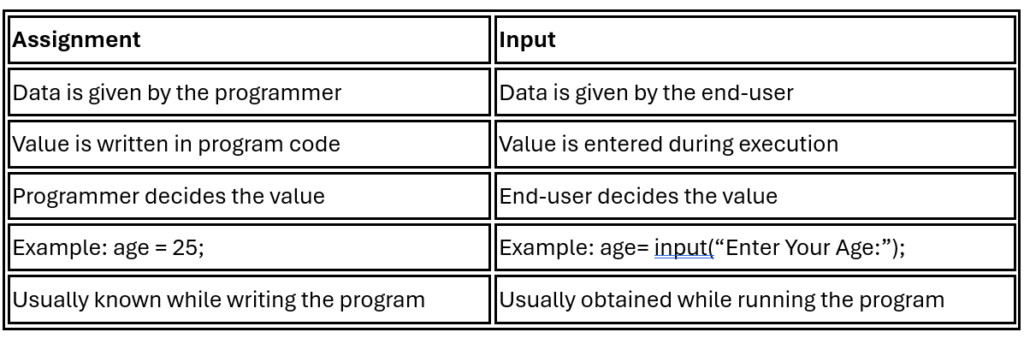
Example
a = 10;
10 is assigned by the programmer.
But:
a=input(“Enter a number:”);
The value of a is supplied by the end-user.
7.Two Ways of Storing Data in a Variable
A variable represents a memory location used to store data.
Data can commonly enter a variable in two ways:
1.Through Assignment
The programmer gives the data directly through coding.
marks = 85;
Concept:
Programmer → Assignment → Variable
2.Through Input
The end-user gives the data while the program is running.
marks=input(“Enter a number:”);
Concept:
End-User → Input → Variable
8.Why Is User Input Required?
If every value were directly assigned by the programmer, the program would work with the same data every time.
For example:
a = 10;
b = 20;
print( a + b);
Output:
30
The user cannot choose different values.
But if we use input:
a=input(“Enter a number:”)
b=input(“Enter a number”)
print(a + b);
The user can enter:
10
20
Output:
30
Another user can enter:
100
200
Output:
300
Thus, user input makes a program flexible and interactive.
9.Input Makes a Program Dynamic
Consider:
age = 25;
The program always uses 25 unless the programmer changes the code.
But:
age=input(“Enter a number:”)
allows different users to enter different ages.
Therefore:
Assignment provides data from the programmer, whereas input allows the end-user to provide data during program execution.
⭐ Remember
Programmer → Writes Program → Computer
End-User → Provides Input → Computer → Produces Output → End-User
Assignment: Programmer → Variable
Input: End-User → Variable