Steps Involved In Programming
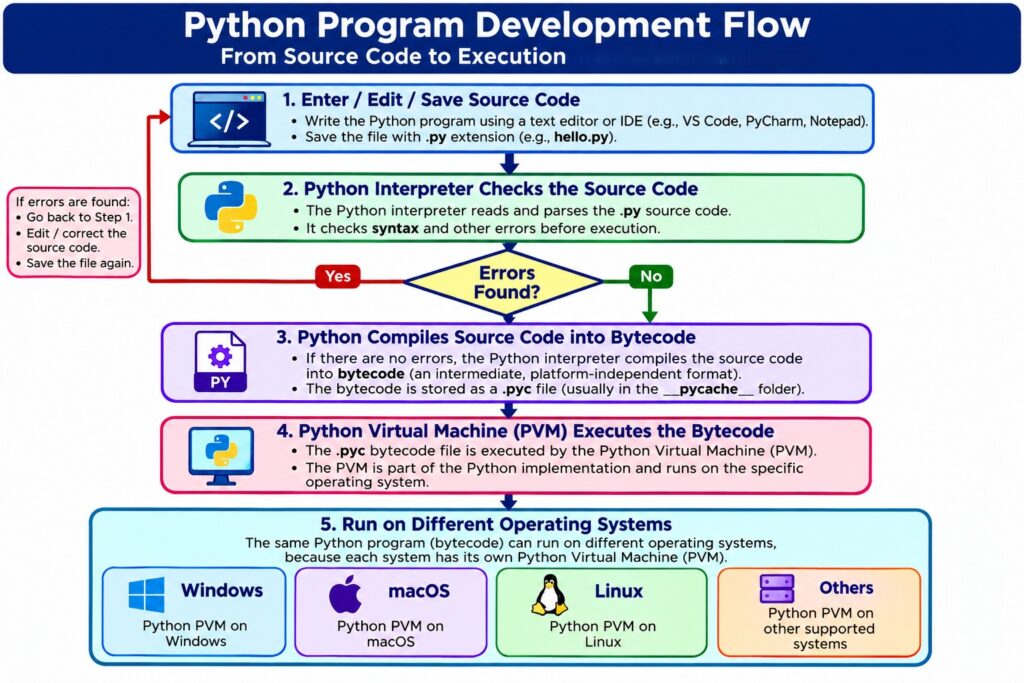
Steps in Python Program Development:
1. enter and save source code of python using any text editor app like notepad, notepad++, sublime etc. with file extension .py
2. translate the source code into machine code using a language translator app (compiler) which creates .pyc file
3. Hand over the .pyc file to PVM (Python Virtual machine) of respective O/s to interpret the compiled code into Machine Executable
IDE (Integrated Development Environment):
It is a software that provides all the facilities required to develop a small program to manage entire software project.
Many IDEs developed by different vendors are available for every programming language.
Popular IDEs for Python programming:
IDLE, Thonny, Pycharm, Spyder, Jupiter, Atom, VS Code etc.
Some IDEs support more than one programming lang too.
Eg: VS Code Supports java, python, javascript etc.
As a student, we can also practice programming with Online Editors too.
Download & Installation:
The latest version of Python can be freely downloaded from www.python.org which maintained by PSF (Python Software Foundation).
After installation, the default Shell version and Editor versions are available through Python IDLE (Integrated Development and Learning Environment) which is Free IDE.But based on the developer’s purpose, convenient and taste there are different IDE’s available in the internet.
An IDE enables autocompletion and Auto Suggestion of Code, program elements displaying in different colors for easy identification, using copy and paste we can easily insert the repeating code and using find & replace we can easily navigate through the code and many others.
Download and install Thonny IDE
Save python program with .py extention
Run program-F5
The Following are some Sample Programs:
#Program1
print ("Hello, Welcome to Python")#Program2
x=10
print("x=",x)#Program3
a=12
b=24
c=a+b
print("sum=",c)#Program4
a=23
b=45
c=67
avg=(a+b+c)/3
print("Average=",avg)#Program5
len=67
bre=34
area=len*bre
print("Area of Rectangle=",area)